Archiware P5 Version 7.4
Find all relevant information and links
Overview of New Features
- New Visual Dashboard: Featuring backup, archive and synchronize job tracking
- P5 Archive DLM: Add-on for improved data lifecycle management
- Archive to Multiple Pools: Archive up to three storage pools simultaneously
- LTO Volume Cloning: Added data protection
- Preview Clients: Distributed preview generation across multiple clients
- S3 Object Archive: Parameters for controlling the archiving
Configurable P5 Dashboard
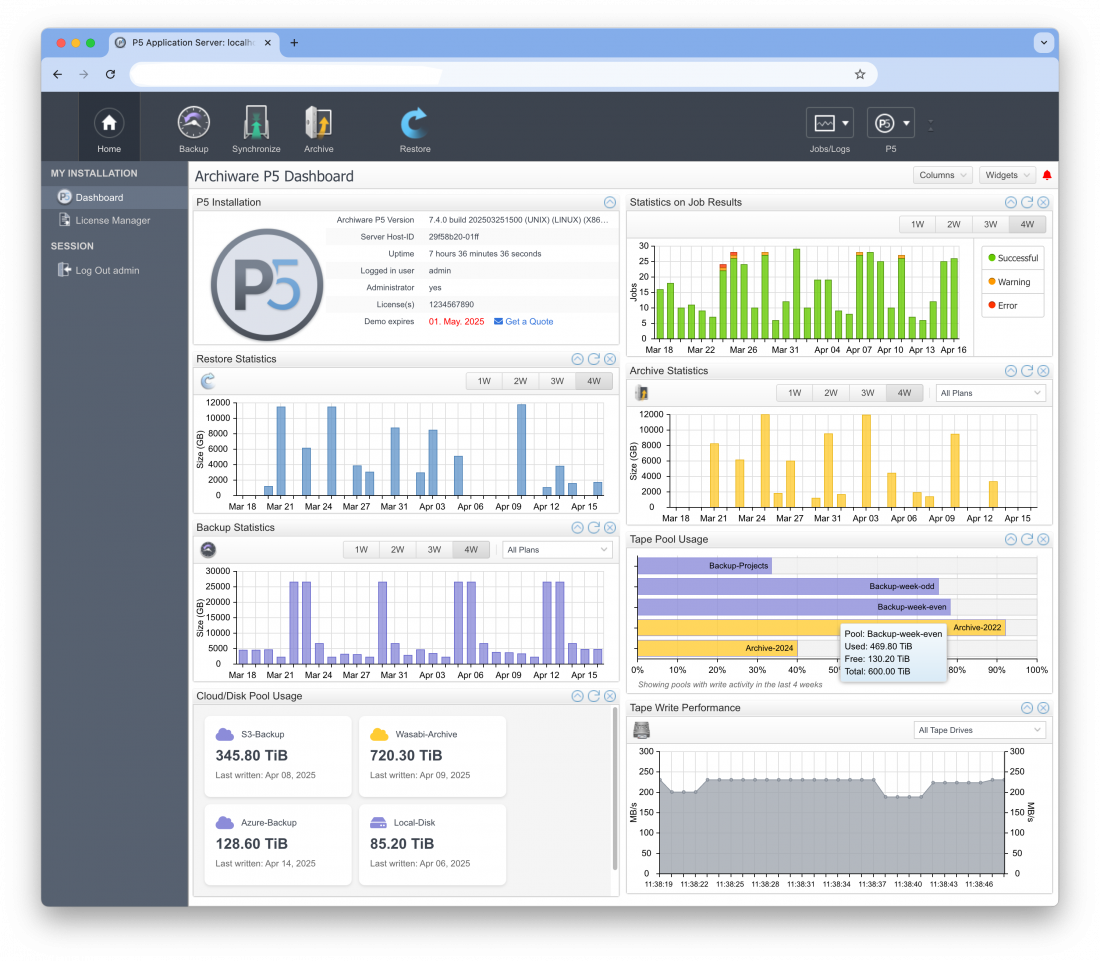
Upon login, users are presented with a customizable dashboard made up of multiple information panes. These panes can be resized and rearranged to suit individual preferences. By default, the dashboard includes dedicated panes for P5 installation and license details.
Existing users can add graphs to visualize backup, archive, or sync activity over selectable periods ranging from 1 to 4 weeks. Graphs can display total job data or allow filtering by specific plans via a drop-down menu. An overall statistics graph highlights job completion trends over time, with color indicators for success and failure.
This intuitive visual interface enables P5 administrators to quickly verify that all scheduled jobs have run as expected – at just a glance.
P5 Archive DLM (Data Lifecycle Management)
The P5 Data Mover add-on has been renamed to P5 Archive DLM (Data Lifecycle Management), paving the way for new features under the DLM umbrella – starting with the Volume Verification feature in version 7.4. Existing customers who previously purchased P5 Data Mover will receive this new feature at no additional cost upon upgrading.
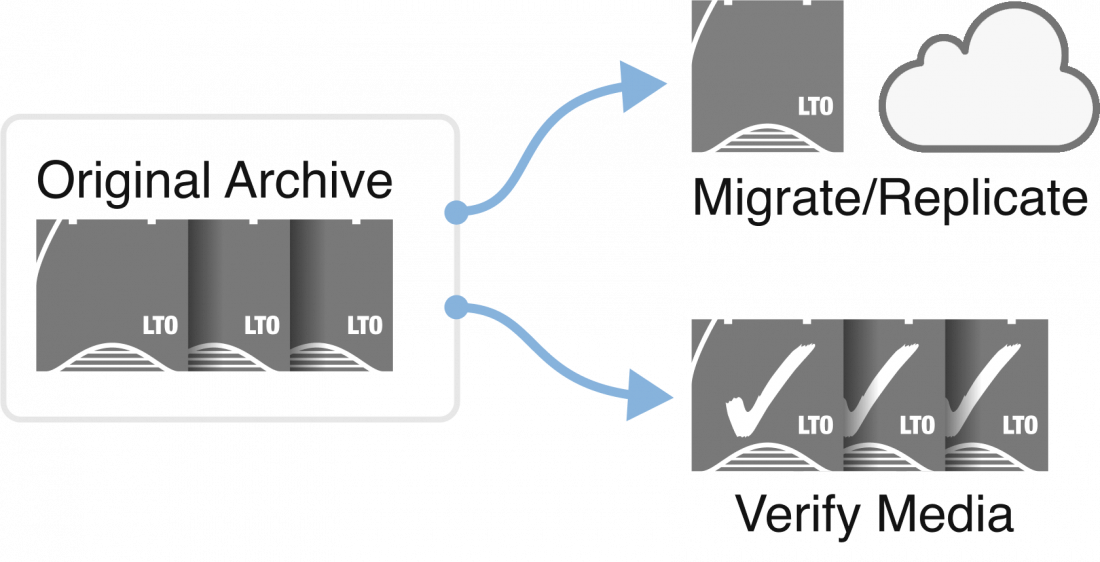
Volume Verification enables users to verify the integrity of archived data across entire Archive Pools (tape, cloud, or disk), or to filter selections based on archive date or metadata – using the same selection logic as a migration plan.
Since version 6.0, P5 has stored checksums alongside archived files. During verification, data is read and compared against these stored checksums to confirm file integrity. Any unreadable files are reported in the verification job. For files archived with versions prior to 6.0, a successful read is treated as successful verification.
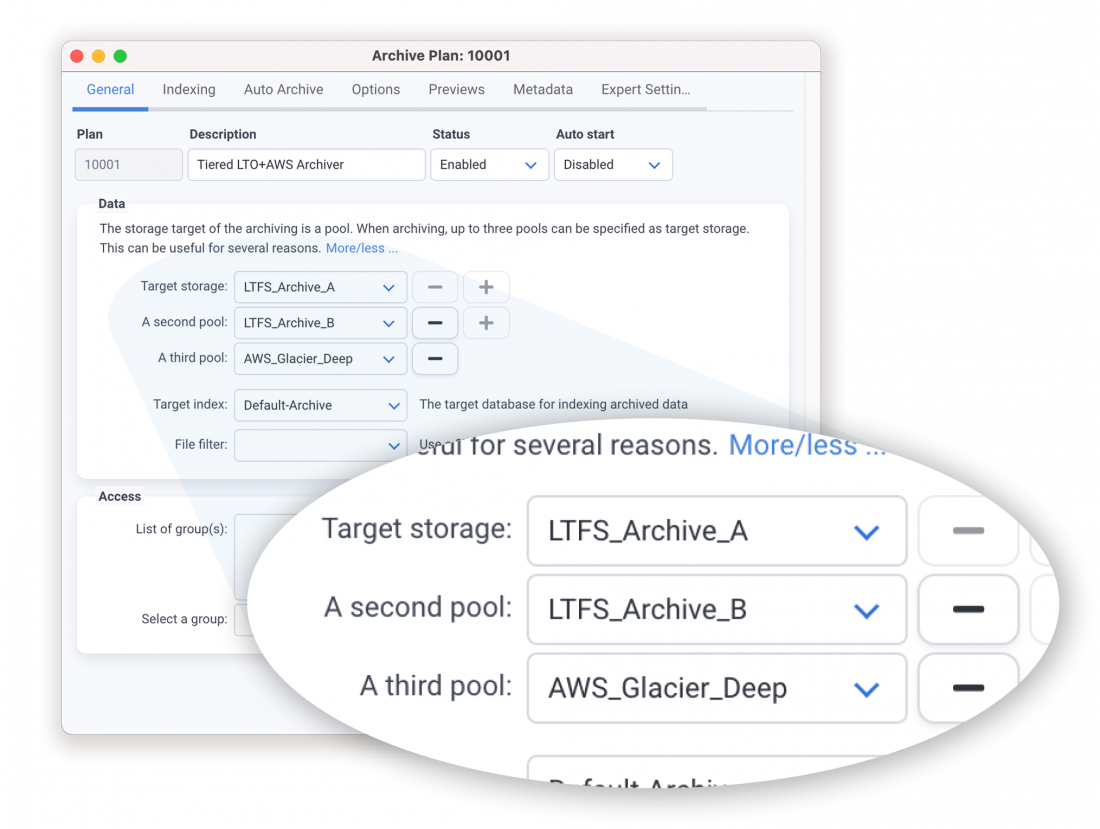
Pools can be of different types (e.g., tape, cloud, disk) or different generations of LTO. This offers greater flexibility than traditional cloning, supporting diverse storage strategies like tape + cloud or three-tier redundancy.
Each pool is written to via an individual job, which reads from the source and writes to the target independently. These jobs are visible in the job monitor and operate at speeds dependent on the source and destination (e.g., cloud writes may be slower than tape).
Unlike cloning, this feature does not create identical tapes. Instead, it distributes the data across the defined pools. In contrast, cloning writes two identical copies in parallel, with each tape in the pair containing the exact same data. Cloned tapes must be written together until full, and a failed tape can be re-created from its clone. Either tape in a cloned pair can be used for restores.
Create Volume Clones (LTO)
P5 Archive now allows existing archive volumes – originally written without cloning enabled via pool settings – to be cloned after the archive has been completed. This is done through a new option in the Volume List, providing added flexibility for users who want to introduce redundancy later in their data protection workflow.
Archive to Multiple Pools
P5 now supports archiving to up to three target storage pools simultaneously. When an archive job runs, each file is saved to all specified pools, while only a single entry is created in the archive index. This entry includes pointers to each pool location, allowing, for example, a user with two LTO drives to create duplicate copies on separate LTFS tapes with a single job configuration.
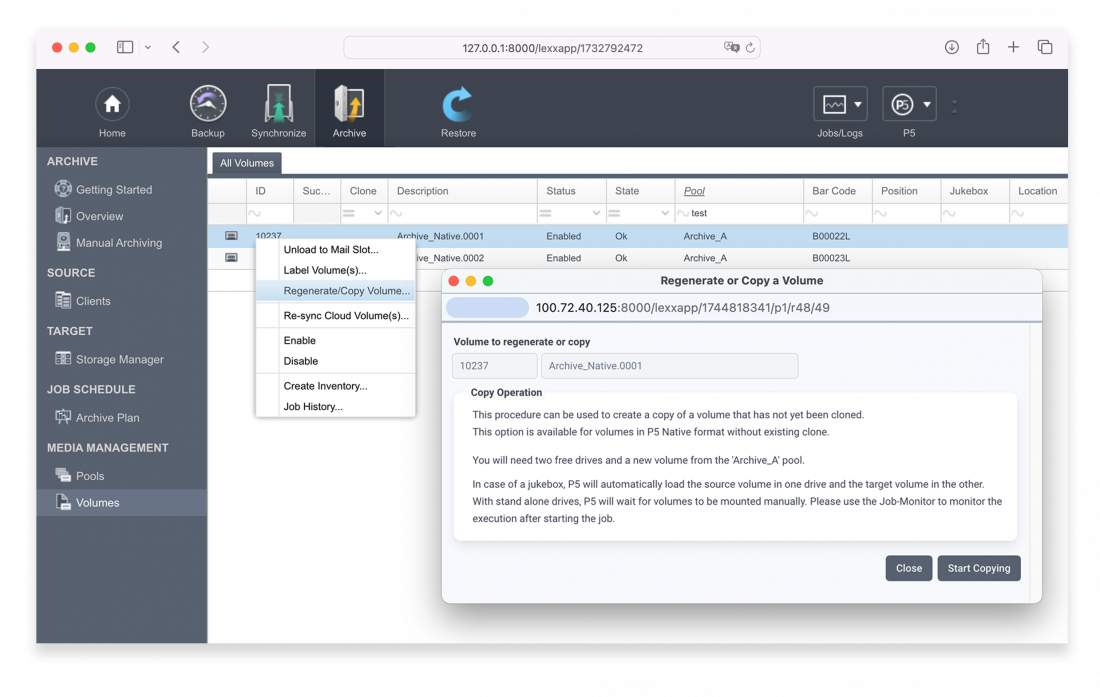
Creating a second copy of a volume is an effective way to safeguard archived data, especially when one copy can be stored offsite for disaster recovery. This feature enhances long-term data integrity and is ideal for environments where archiving jobs are run without prior planning for redundancy.
To clone a volume, two LTO drives are required: one to read the original volume and one to write the clone. A blank volume must also be available in the same pool as the source. The result is a block-identical copy of the original volume, and both volumes are then marked as a cloned pair in the Volume List. Either tape can be used independently for restore operations. Note that cloning is only supported when using the P5 Native format – LTFS is not compatible, as it does not support the block-level access needed for cloning.
This feature adds flexibility and security to P5’s archiving system, allowing for robust redundancy even after data has been archived.
Preview Clients
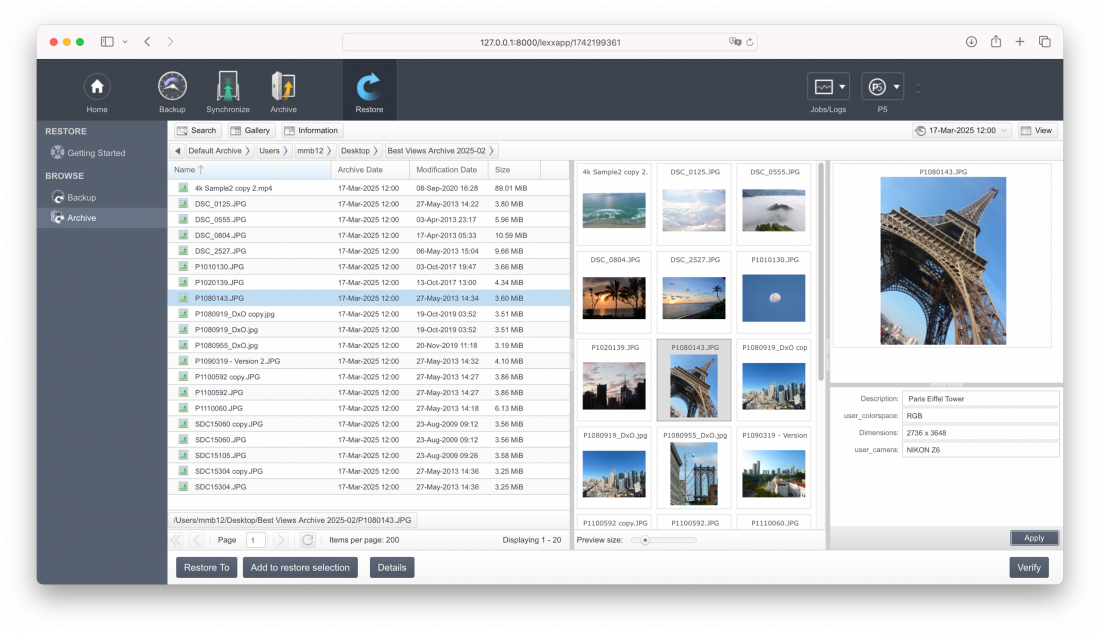
Where a customer has a number of client hosts in their P5 infrastructure, some more powerful than others. 7.4 allows clients to be nominated as Preview Clients. P5 archive tasks will then use all such clients in a round-robin fashion to perform preview generation tasks. UI will be a simple 'checkbox' in client settings to nominate the client as a 'preview client'.
Background: When archiving, P5 uses the P5 host that stores data being archived to create previews/thumbnails. This host might not be powerful enough to generate these quickly enough (e.g. small QNAP NAS), whereas the customer may have other hosts with enough power to perform these tasks.
S3 Object Archive Updates
S3 Object Archive is a feature in P5 that allows data to be archived directly to Amazon S3-compatible object storage, treating it as a long-term archive target rather than traditional tape or disk. Files are bundled into objects and uploaded efficiently to the S3 backend, allowing users to leverage scalable cloud infrastructure for secure, offsite storage.
This method is especially useful for environments that want to eliminate physical media while maintaining archive workflows.
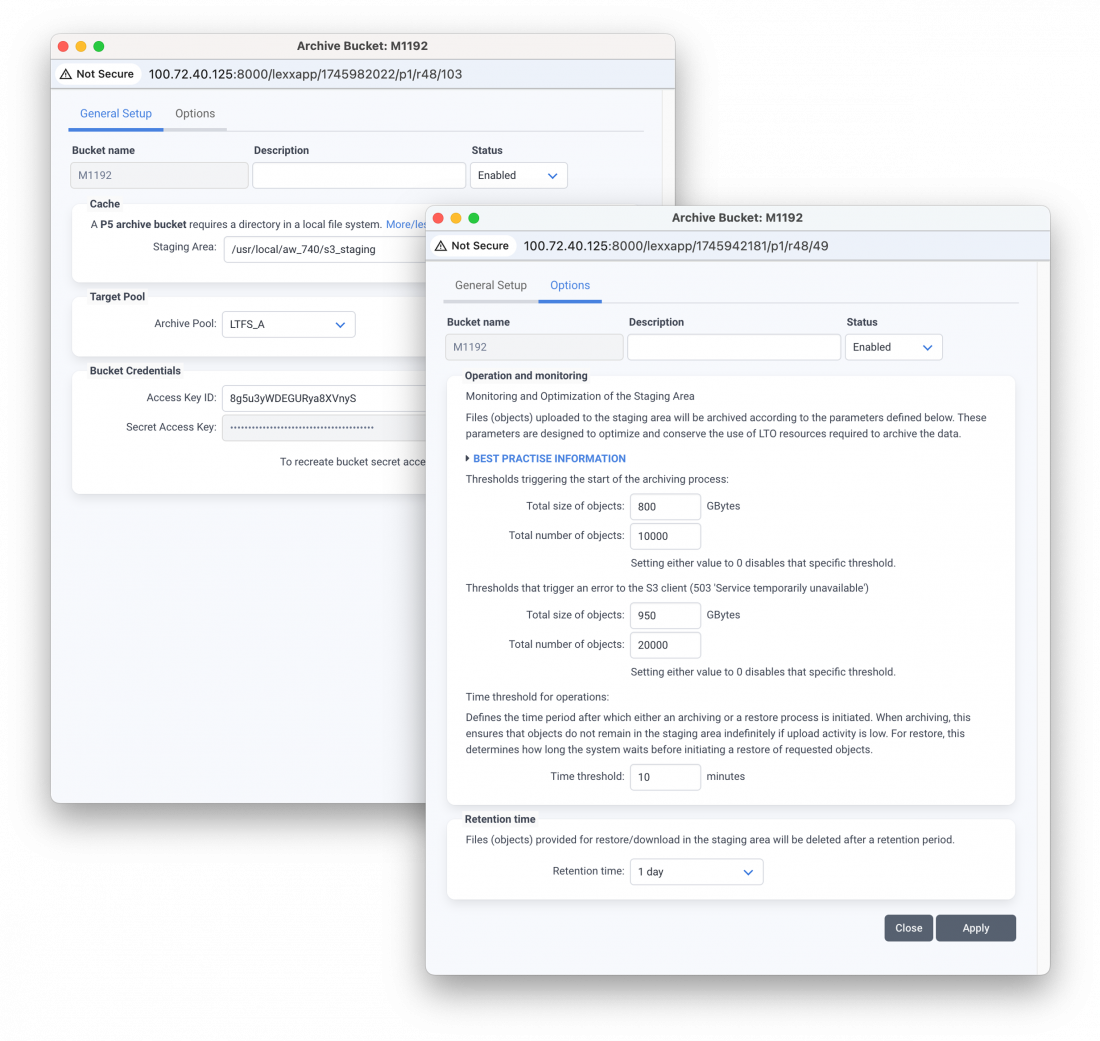
With version 7.4, additional parameters have been introduced to enhance control over the archiving process to S3, particularly around how data is handled in the staging area – the temporary local disk space used before data is bundled and uploaded.
One critical new parameter helps prevent the staging area from overfilling during large or continuous archive jobs, a common risk when dealing with large datasets or limited local storage. By allowing administrators to set thresholds and control batching behavior, P5 can pause or regulate data flow to ensure stability and avoid job interruption.
These new settings improve efficiency and reliability when archiving to the cloud, making it easier to integrate S3 storage into high-volume, long-term archiving strategies without overwhelming local resources.
Requirements - Archiware P5 Version 7.4
Operating System Requirements
| macOS X |
Intel x86 (64-Bit) |
|---|---|
| Windows |
Server 2012R2 |
| Linux |
Intel/AMD x86 64-Bit systems with glibc version 2.15 are supported, including: Unicode UTF-8 Language package is required |
| FreeBSD |
Version 13 and 14 |
|
Synology |
DSM operating system 5.2 – 7 |
|
QNAP |
QTS 4.3+, 5.0+ |
| NETGEAR | ReadyNAS OS 6.6.0 + Intel/AMD x86 64-Bit CPU |
| TrueNAS | Installation through TrueNAS Scale GUI |
| Virtualization | x86 – VMware, Parallels, Linux-Xen, Hyper-V |
Hardware requirements
| Base core | 2 cores and 8 GB RAM |
|---|---|
| Additional per LTO drive | 2 cores and 8 GB RAM |
| Storage | SSD/NVMe required for installation and backup/archive indexes (minimum 20 GB) |
Browser Requirements
| Safari | 13+ |
|---|---|
| Firefox | 70+ |
| Chrome | 80+ |
Compatibilites - Archiware P5 Version 7.4
Supported Tape Technologies
- LTO-1, LTO-2, LTO-3, LTO-4, LTO-5, LTO-6, LTO-7, LTO-8, LTO-9
- S-AIT 1, 2, 3, 4
- AIT 1, 2, 3, 4, 5, 6
- DLT4000-8000
- SDLT220-600
- DLT-S4
- VXA (on request)
- 8mm
- DAT
Disk Storage
- Direct attached storage (DAS)
- FreeNAS
- HyperFS
- MetaSAN 4.5.0.0 (Windows/Linux supported from 4.6.0.0)
- QNAP NAS
- RAID
- Scale Logic
- Seagate LaCie
- Storage area network (SAN)
- StorNext
- Synology NAS (as of P5 Version 5.3.3)
- SSD
- Tiger Store
- Vtrak FS
- XSAN
Proprietary File Systems
- Helios (UB, UB+, UB2, UB64)
- Xinet 14.0+
- Netatalk 2
- Windows Services for Macintosh
Supported Interfaces
- SAS
- SCSI
- iSCSI
- FibreChannel
- Firewire
- USB
- SATA
- eSATA
- Thunderbolt
Supported Cloud Services
- Alibaba Object Storage Service
- Amazon S3
- Amazon Snowball
- Amazon Glacier
- Backblaze B2
- Exoscale as Generic S3
- Generic S3
- Google Cloud Storage
- Hitachi S3 (as generic S3)
- Huawei (as generic S3)
- Microsoft Azure
- MinIO (as generic S3)
- Oracle Cloud Storage
- OrionVM (as generic S3)
- RSTOR Space (as generic S3)
- Seagate Lyve Cloud
- Synology C2 Object Cloud Storage (as generic S3)
- Viking Cloud Native Obsidian
- Wasabi Cloud Storage
Supported platforms include macOS X, Windows, Linux, FreeBSD, QNAP, Synology, and NETGEAR
Cloud Object Storage Classes
- Amazon S3: S3 Standard, S3 Intelligent-Tiering, S3 Standard-IA, S3 One Zone-IA
- Amazon Glacier: Standard, Deep Archive
- Google: Standard, Nearline, Coldline
- Microsoft Azure: Standard Hot, Cool
MAM/DAM Integrations
- axle
- Final Cut Server
- Canto Cumulus
- CANTEMO
- CatDV
- cavok (Peak-14)
- DALIM ES
- Editshare
- eMAM
- FocalPoint Server
- KeyFlow ADAMS
- KYNO
- Metus
- Projective Strawberry
- Streamline Pro
- Xinet
Supported Tape Library Vendors
- Actidata
- BDT
- Dell
- HPE
- IBM
- MagStor
- mLogic
- NEC
- Oracle/StorageTek
- OWC
- Overland-Tandberg
- Qualstar
- Quantum
- Spectra Logic
- SYMPLY
Supported Hardware Manufacturers
- Accusys
- Apple
- BDT
- Bright Technologies Astella
- DDP
- Dell
- Drobo (as a disk)
- Facilis
- FAST LTA
- GB Labs
- G-Technology
- HPE
- IBM
- LaCie
- mLogic
- NEC
- NetApp
- Netgear
- Overland-Tandberg
- Perifery
- Promise
- QNAP (as of P5 version 5.5.3)
- Qualstar
- Quantum
- Samsung
- Scale Logic
- Sonnet
- Spectra Logic
- Starline
- Sun/Oracle
- SYMPLY
- Synology (as of P5 Version 5.3.3)
- ToolsOnAir just:store
- UNITEX
FAQ - Updating to Archiware P5 Version 7.4
What is new in Archiware P5 version 7.4?
For more information about version 7.4, please refer to the New Features page. Important information about platform and module limitations can be found on the Discontinuations page.
Which PresSTORE or Archiware P5 versions can directly update to version 7.4?
- Only version 6.x/7.x can be updated directly to version 7.4.
- Version 5.x needs to be updated to version 6.1 first.
For more details please refer to Upgrade FAQ 6.1. - Version 4.4 needs to be updated to version 5.1 first.
For more details please refer to Upgrade FAQ 5.1. - Older versions need to be updated to version 4.4.x. first.
For more details please refer to Upgrade FAQ 4.4.
Direct update of Synlogy DSM 7+ is only possible once it appears in the Synology Applications Webshop. It is possible, however, to use the Docker installation, if an upgrade to P5 7.4 on Synology DSM 7+ is required. Since an upgrade to of any server to 7.4 also requires all clients to be updated, please take this into consideration in case any of the clients are a Synology DSM 7+.
Note: Support for PresSTORE 4 (P4) backup and archive indexes is discontinued in version P5 5.6 and later.
Who is entitled to an update free of charge?
The update is free of charge for all customers who:
- purchased or registered P5 after May 13th, 2024 or
- had active Software Maintenance on May 13th, 2025.
Validity of the Software Maintenance Agreements can be verified in the Archiware Portal.
How much does it cost to update an installation when Software Maintenance is expired?
Updates are available through the Archiware Software Maintenance. For all licenses that ran out of maintenance, a reactivation of Software Maintenance is possible. It covers two major aspects:
1. access to the latest software version, and
2. access to manufacturer support. Prices depend on how long the maintenance is expired:
- Expiration <1 year: 35% of the license price according to the current price list
- Expiration <2 years: 60% of the license price according to the current price list
- Expiration <3 years: 70% of the license price according to the current price list
The reactivated maintenance is valid for 12 months, starting on the 1st of the month following the Archiware invoice date. For more details about Archiware Software Maintenance & Support please refer to the Maintenance & Support.
Where can I get a quote for reactivation of Archiware Software Maintenance?
In order to receive a Software Maintenance reactivation quote, please contact your local reseller or request one through the Archiware Portal.
Which preparations should be made before the update?
- Make sure you meet the System Requirements.
- Make sure that a required platform or function has not been discontinued.
- Make sure you are eligible for the required license (point 3/4) or request a corresponding quote (point 5).
- Read the Important Notes for important information regarding any necessary changes in the affected installations.
- For safety purposes, please make a copy of the installation directory!
Do I need new license keys for the update and where can I get them?
All installations with an up-to-date key and a valid Software Maintenance Agreement do not need a new license key. Installations without an up-to-date key have to request one through the Archiware Portal.
What are the system requirements for P5 version 7.4?
On this dedicated page, you will find all information about System Requirements for P5 version 7.4.
Which features of previous versions are no longer available in P5 version 7.4?
On this dedicated page, you will find all information about Discontinuations for P5 version 7.4.
Please read the Important Notes for information regarding any necessary changes in the affected installations.
What technical effort is required for the update?
An update from version 6.x/7.0 installation is comparable to a new installation. The installer automatically detects an existing version and executes all necessary changes in the application and its configuration. Please check if it might be necessary to take precautions for a downgrade (see point 13). For security reasons, please create a copy of your installation directory.
Important Note for updating from 5.2 and previous releases: In some rare cases, a full backup may be necessary for P5 Backup. Therefore, the first backup after the upgrade will require the appropriate amount of time and backup capacity. The reason for this is that any missing drive information is mandatory in version 6.0 and higher.
Do all clients/agents have to be updated to P5 version 7.4 as well?
Yes, version 7.4 has to be installed on all servers, workstations and virtual server agents. Please read the Important Notes for information regarding any necessary changes in the affected installations.
Will all my settings remain intact when updating?
Yes, all settings remain intact when installing P5 version 7.4.
Is it possible to downgrade to a previous version after updating to P5 version 7.4?
After upgrading from version 7.3, a downgrade back to 7.3 is possible with the following limitation:
- All P5 Server and Workstation Agents have to be downgraded as well
Note: please refer to the necessary preparations described in point 6.
In case it is necessary to re-activate version 6, this can only be done through a new installation and a subsequent restore of the configuration from a security copy made previously.
Upgrading from Archiware P4
Files stored with P4 can be restored through P5, but only with reduced functionality and without search capabilities.
P5 Backup: After having upgraded to P5 Backup, a full backup run is required.
Please be sure to schedule backup time and capacity accordingly.
P5 Archive: P5 Archive requires a conversion of the P4 archive index. To do so, each archive index has to be converted within the administration section of P5. Depending on the size of the index as well as computing power, this process can take anything between minutes and hours.
For more details, please read the P5 Upgrade Guide.
Now, to download the installer package, please return to the Download page and click "New Install".
macOS
Intel x86 (64-Bit)
macOSX 10.9 – 15.x
Apple M-series:
macOSX 11.x – 15.x
macOS - tgz
Intel x86 (64-Bit)
macOSX 10.9 – 15.x
Apple M-series:
macOSX 11.x – 15.x
Windows
Server 2012R2
Server 2016
Server 2019
Server 2022
Windows 8.1, 10, 11
Linux - deb
Intel x86 64-Bit systems with glibc version 2.15
Ubuntu 12+
Debian 8+
Linux - rpm
Intel x86 64-Bit systems with glibc version 2.15
OpenSuSE 12.2+/SLES 12+
CentOS 7+/RHEL 7+/Fedora 19+
QNAP
QTS 4.3+, 5.0+
QTS hero
QTScloud
Intel x86 64-Bit CPU
Synology 7+
Intel x86 64-Bit CPU
DSM operating system 7
Latest P5 released version 7.4.5
Synology 7+ or Linux Docker
Prerequisite:
Installed Docker (Linux) or
Container Manager (Synology)
Intel x86 64-Bit CPU
DSM 7+ or Linux OS
Latest P5 version 7.4.1
TrueNAS on FreeBSD
Based on FreeBSD 12 and FreeBSD 13
Available as plugin:
In TrueNAS Community under Archiware P5
P5 Version Archive
Version 7.4
Information and Downloads for P5 Version 7.4
Version 7.3
Information and Downloads for Version 7.3
Version 7.2
Information and Downloads for Version 7.2
Version 7.1
Information and Downloads for Version 7.1
Version 7.0
Information and Downloads for Version 7.0
Version 6.1
Information and Downloads for Version 6.1
Version 6.0
Information and Downloads for Version 6.0
Version 5.6
Information and Downloads for Version 5.6
Version 5.5
Information and Downloads for Version 5.5
Version 5.4
Information and Downloads for Version 5.4
Version 5.3
Information and Downloads for P5 Version 5.3
Version 5.2
Information and Downloads for P5 Version 5.2
Version 5.1
Information and Downloads for P5 Version 5.1
Version 5.0
Version 5.0 is no longer available.
It has been replaced by compulsory upgrade Version 5.1 which is identical in functionality.
Version 4.4
Information and Downloads for PresSTORE P4 Version 4.4